You need to autonomously build a cinematic, real-time browser experience inspired by the iconic "X-wing destroys the Death Star" space battle.

Use:

- Three.js
- WebGL
- GLSL
- TypeScript / JavaScript

The result should feel like a polished playable cinematic sequence, not a static 3D demo.

Do not stop at planning. Implement, run, visually inspect, debug, polish, and self-verify the complete experience.

# CORE EXPERIENCE

Create a complete sequence:

```
SPACE APPROACH
    ↓
X-wing squadron approaches the Death Star
    ↓
TIE fighters intercept
    ↓
surface approach
    ↓
enter trench
    ↓
high-speed trench run
    ↓
turbolaser fire + obstacles
    ↓
targeting phase
    ↓
fire proton torpedoes
    ↓
torpedoes enter exhaust port
    ↓
escape sequence
    ↓
Death Star destruction
    ↓
massive cinematic explosion and shockwave
```

Target total experience: **~2-4 minutes**, with the final trench run being partially playable.

## 1. VISUAL TARGET

Aim for cinematic realism. The experience should immediately communicate enormous scale, high
velocity, dangerous close-range flying, dense mechanical detail, bright laser fire against dark
space, physically convincing spacecraft materials, and dramatic final destruction. Avoid a
toy-like or primitive appearance. Prioritise, in order: silhouette, scale, lighting, motion,
materials, VFX, environmental detail.

## 2. X-WING

Build a high-quality X-wing-inspired starfighter procedurally with Three.js geometry: fuselage,
cockpit, canopy, nose, four wings, S-foil mechanism, four engine nacelles, engine exhaust, four
laser cannons, landing/mechanical details, panel lines, astromech area. The S-foils should
animate from cruise configuration into attack position. Use PBR materials for painted metal,
exposed metal, glass and mechanical components. Use GLSL for engine glow, subtle heat distortion
and laser emission. The craft must remain visually convincing in close-up cinematic shots.

## 3. DEATH STAR

The Death Star must feel enormous. Do not simply create a smooth gray sphere. Build it using
multiple visual scales - MACRO: spherical body, equatorial trench, superlaser dish, large
structural regions. MESO: panels, trenches, mechanical bands, large surface structures. MICRO:
procedural panel patterns, vents, towers, pipes, antenna structures, machinery, emissive windows.
Use procedural generation and instancing aggressively. At long distance, shader detail can
provide complexity; at close distance, especially around the trench, use actual geometry. The
player should transition seamlessly from viewing the entire station to flying meters above its
surface.

## 4. PROCEDURAL DEATH STAR SURFACE

Create reusable procedural surface generators using InstancedMesh, BoxGeometry, ExtrudeGeometry,
procedural grids, seeded randomness and modular mechanical components. Generate towers, vents,
pipes, channels, plates, antennae, machinery and recessed structures. The trench should be
significantly more detailed than distant regions. Use distance-based complexity or LOD where
useful.

## 5. TRENCH RUN

This is the centerpiece. Build a long procedural trench containing walls, floor, pipes, towers,
bridges, mechanical obstacles, turbolaser emplacements, lights, vents and moving machinery. The
environment must create a strong sensation of speed. Use repeating modular segments, seeded
variation, InstancedMesh, object pooling and distance culling. Do not make the trench obviously
repetitive.

## 6. FLIGHT

Implement lightweight arcade flight controls. During the trench run allow horizontal movement,
vertical movement, roll, slight pitch, acceleration / boost, laser fire and proton torpedo fire.
Flight should feel responsive and cinematic rather than physically simulated. Use camera inertia
and subtle craft banking. Include optional autopilot/cinematic mode so the entire sequence can
play without user input.

## 7. ENEMIES

Create procedural TIE-fighter-inspired enemies supporting pursuit, formation flying, attack
passes, laser fire, evasive movement and destruction. Use lightweight steering rather than
expensive physics. Create multiple simultaneous fighters using shared geometry/materials.

## 8. TURBOLASERS

Death Star surface defenses should track and fire toward the player: rotating turrets, targeting,
laser bolts, muzzle flashes, near misses, impact sparks and surface explosions. Use pooling for
projectiles and effects.

## 9. GLSL VFX

GLSL should be a major part of the visual quality. Build custom shaders for SPACE (procedural
stars, nebula variation, subtle galactic dust), ENGINES (emissive core, bloom-friendly falloff,
animated turbulence, heat distortion), LASERS (bright core, soft outer glow, animated energy),
EXPLOSIONS (expanding fireball, turbulence, black-body-inspired color progression, smoke/debris
interaction), SHOCKWAVES (expanding spherical/ring wave, distortion, emissive edge, fading
energy) and the DEATH STAR SURFACE (procedural panel variation, roughness variation, subtle
emissive details).

## 10. PROTON TORPEDO SEQUENCE

The final attack must be visually clear. Create a targeting phase showing a targeting reticle,
the exhaust port, lock progression, incoming fire and cockpit/ship feedback. When fired, create
two glowing proton torpedoes and animate them: X-wing → forward trajectory → curve toward exhaust
port → enter port → travel internally. Use curves, particles, GLSL glow and camera choreography.
The successful shot should trigger the destruction sequence.

## 11. DEATH STAR DESTRUCTION

Do NOT implement the final destruction as sphere → flash → disappear. Make it a multi-stage
cinematic event.

- **STAGE 1 - INTERNAL FAILURE.** After the torpedo enters: internal flashes, sequential surface
  explosions, emissive cracks, energy propagation.
- **STAGE 2 - CORE IGNITION.** A rapidly growing internal energy source becomes visible. Use a
  GLSL volumetric/fireball approximation.
- **STAGE 3 - STRUCTURAL FAILURE.** Generate surface explosions, debris, glowing fragments,
  expanding fire, panel fragments.
- **STAGE 4 - PRIMARY EXPLOSION.** Create an enormous expanding fireball using animated noise,
  FBM, radial displacement, emissive HDR colors, layered transparent shells and particles.
- **STAGE 5 - SHOCKWAVE.** Generate a huge expanding shockwave that travels rapidly past the
  escaping X-wing, distorts the background, illuminates nearby objects and expands far beyond the
  original station radius.
- **STAGE 6 - DEBRIS FIELD.** After the primary explosion: glowing fragments, smoke, embers and
  cooling debris remain visible.

The complete destruction sequence should last several seconds.

## 12. CINEMATIC CAMERA

Create a camera director with multiple shots: wide shot of Death Star against stars; X-wing
squadron enters frame; close-up tracking alongside X-wing; TIE fighters approach; camera dives
toward Death Star surface; rear chase camera entering trench; high-speed trench gameplay; close
targeting shot; torpedo launch; torpedo tracking shot; X-wing pulls away; wide Death Star
explosion; shockwave overtakes camera; X-wing escapes toward space. Use spline camera paths,
dynamic FOV, camera shake, motion emphasis and smooth transitions. Avoid abrupt arbitrary camera
cuts.

## 13. POST PROCESSING

Use appropriate real-time post processing: bloom, tone mapping, subtle vignette, color grading,
optional motion blur approximation, explosion exposure response. Use ACESFilmicToneMapping and
correct sRGB output. Bloom should emphasize engines, lasers, torpedoes and explosions without
washing out the entire image.

## 14. PERFORMANCE

Target smooth desktop browser performance. Use InstancedMesh, shared Geometry, shared Materials,
object pooling, LOD, distance culling, procedural generation and shader-based detail. Avoid
creating thousands of independent materials or draw calls. The Death Star should appear extremely
detailed without requiring millions of individually managed objects.

## 15. PARALLEL SUBAGENTS

Use domain-specific subagents aggressively: X-wing / Vehicle Agent, Death Star Geometry Agent,
Trench Environment Agent, GLSL / VFX Agent, TIE Fighter / Combat Agent, Flight / Gameplay Agent,
Cinematic Camera Agent, Integration / Performance Agent. Each agent should own clearly scoped
files. Shared systems should be integrated centrally to avoid conflicts. Do not wait for one
domain to finish before starting unrelated work.

## 16. SELF-VERIFICATION

Perform at least THREE dedicated visual QA passes.

- **PASS 1 - Geometry & Scale.** Inspect the X-wing, TIE fighters, Death Star, trench and surface
  machinery. Check silhouettes, proportions, scale, intersections and obvious primitive-looking
  geometry. Fix problems.
- **PASS 2 - Gameplay & Cinematics.** Play the entire sequence. Check pacing, controls, enemy
  behavior, trench readability, targeting, torpedo sequence, camera transitions and escape timing.
  Fix problems.
- **PASS 3 - VFX & Final Quality.** Inspect engines, lasers, impacts, shaders, bloom, the Death
  Star explosion, shockwave, debris, exposure and performance. The final explosion is a hero
  moment. If it looks like a simple particle explosion, continue improving it.

## 17. FINAL REQUIREMENT

Deliver a complete browser experience that can run from beginning to end: approach → battle →
trench run → targeting → torpedo launch → escape → Death Star destruction. The experience must
work both interactively and as an autonomous cinematic demo. Do not stop after creating
individual assets. Assemble them into the complete sequence. Run the application yourself,
capture screenshots of major milestones, inspect the results, fix visual problems, and repeat
until the experience is polished and stable.

Do not claim completion unless the entire sequence has been executed and visually verified
end-to-end.
Prompt by PhiloLabs on GitHub. github.com/PhiloLabs/fable51-worlds/blob/HEAD/death-star-trench-run/PROMPT.md . Copies include this credit. 
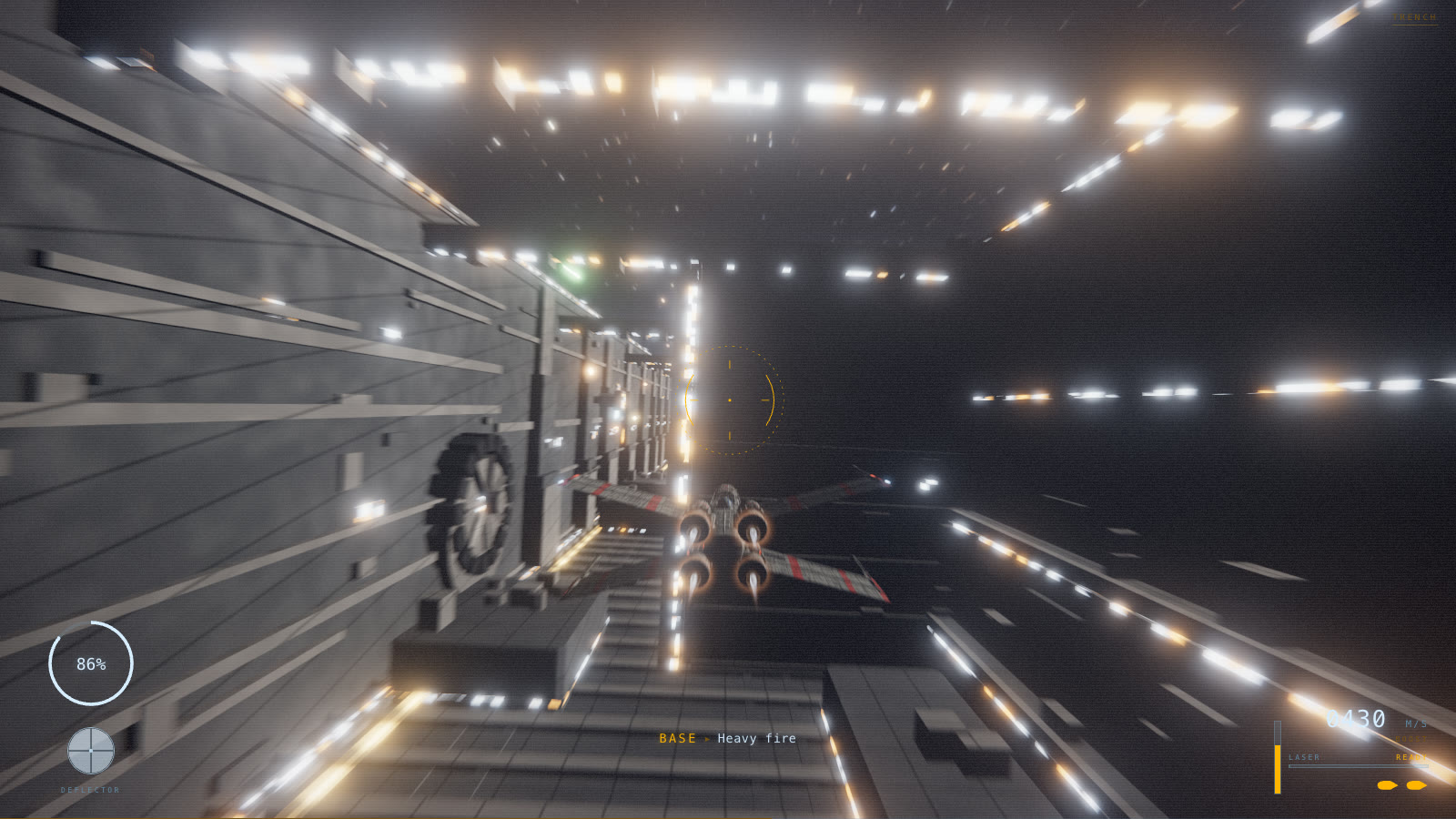 Lit Trench FlythroughPhiloLabs · Cinematic animations